
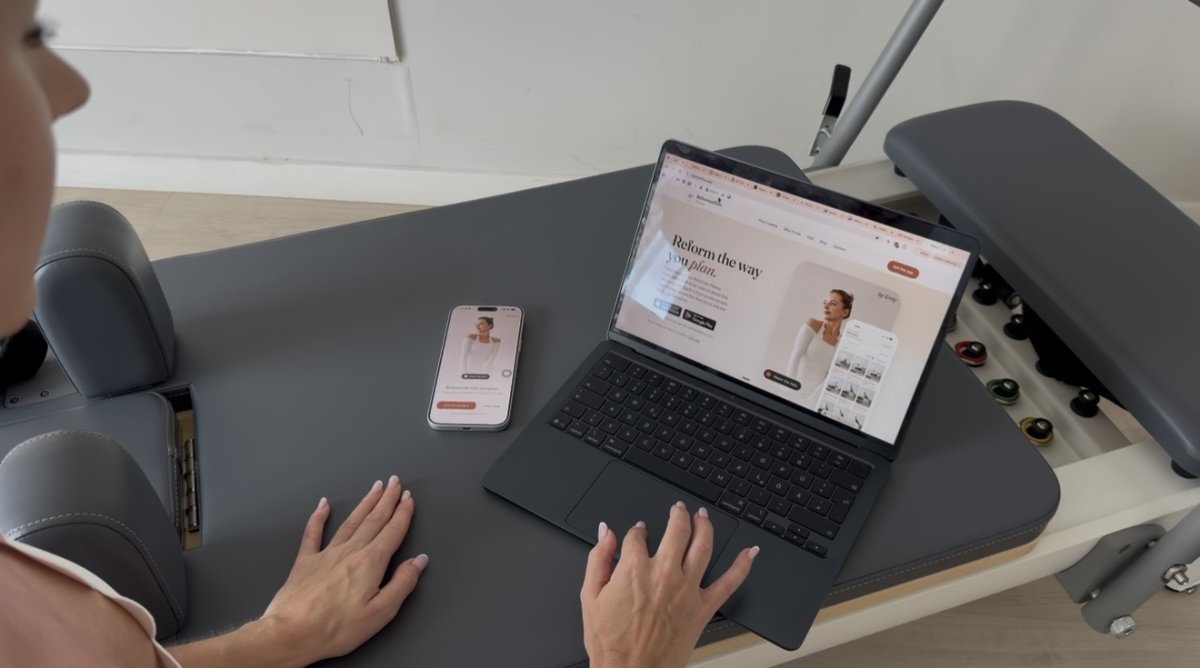
Spending two hours planning a single Reformer session isn't a sign of dedication. It's a fast track to professional burnout. You love the energy of the studio, but the unpaid hours spent agonizing over transitions and spring setups can feel like a second, heavier job. Many instructors find themselves hitting a wall of brain fog mid-class, momentarily losing the thread of a sequence while a room full of clients waits for the next cue.
This guide shows you how a professional reformer pilates drag and drop class builder transforms that mental load into a streamlined, five-minute task. We'll explore how to leverage a curated library of over 400 exercises to eliminate decision paralysis and keep your focus where it belongs: on your clients. You'll learn to build a 50-minute sequence that flows logically and maintains consistent spring configurations across different studio machines. We're covering everything from rapid sequencing to using a glanceable digital co-pilot that ensures you never miss a beat during a live session.
Key Takeaways
- Reclaim your personal time by shifting from manual note-taking to a visual system that builds full 50-minute classes in five minutes.
- Eliminate decision fatigue using a reformer pilates drag and drop class builder with a curated library of 400+ high-quality moves.
- Protect your teaching presence with a glanceable digital co-pilot that keeps your transitions seamless and your cues precise.
- Solve spring color confusion by setting machine-specific configurations for different reformer brands directly within your plan.
- Identify clunky transitions and "flow killers" visually before your clients ever step onto the carriage.
Table of Contents
- The Evolution of Reformer Pilates Class Planning
- What is a Reformer Pilates Drag and Drop Class Builder?
- The Strategic Benefits of Visual Sequencing
- Personalized Precision: Machine and Spring Integration
- How to Build Your Next Class in 5 Minutes with ReformerFlow
The Evolution of Reformer Pilates Class Planning
Manual planning is often the invisible weight of a teaching career. For many instructors, crafting a single session involves up to two hours of unpaid labor. You sit with a notebook or a generic phone app, trying to visualize how a Bridge series will transition into a Feet in Straps sequence. This traditional approach creates a heavy cognitive load. You aren't just remembering moves; you're managing spring tensions, safety cues, and client modifications all at once. When the music is loud and the energy is high, a static list of text often fails. It leads to mid-class "brain fog" where the momentum of the session stalls while you search for your next exercise.
Modern studio management requires a shift toward an "instructor co-pilot" model. This approach uses technology to handle the logistical heavy lifting, allowing you to focus on the human element of teaching. A professional reformer pilates drag and drop class builder acts as this co-pilot. It provides a stabilizing force in a high-energy environment, ensuring your sequences are as polished as your physical cues.
From Notebooks to Digital Flow
Static paper plans are essentially fixed. They don't account for the kinetic energy of a live studio. In 2026, clients expect more than just a workout; they want a seamless, innovative experience that respects the origins of the Pilates method while embracing modern flow. Digital tools prevent the common "sequencing rut" where instructors default to the same five moves because they're easy to remember. By using a visual interface, you can experiment with creative blocks and "snap" them into a logical grid. This visual hierarchy makes it easy to spot a clunky transition before a client ever touches the carriage.
Reducing Instructor Burnout Through Efficiency
Burnout is rarely caused by the teaching itself; it's caused by the friction surrounding it. If you reduce your planning time from two hours to five minutes, you reclaim hours of your life every week. This isn't just about speed; it's about the quality of your presence. A well-prepared instructor is a calm instructor. When you have a professional, glanceable reference, you don't have to worry about what comes next. You can stay in the moment, offer better tactile corrections, and engage more deeply with your students. For those looking to master the underlying logic of these movements, understanding how to sequence a reformer pilates class is the first step toward total studio confidence. Efficiency creates the space for mastery.
What is a Reformer Pilates Drag and Drop Class Builder?
A professional reformer pilates drag and drop class builder is a visual workspace designed for sequencing. Unlike a text-based document, this interface represents exercises as "blocks" or cards. You build a class by physically moving these blocks into a timeline. The underlying technology uses a "snap-to-grid" structure. This ensures your 50-minute class remains organized and logically paced. When you move a block, the system automatically adjusts the surrounding flow, maintaining the integrity of your session's arc.
The primary difference between a generic fitness planner and a specialist Reformer tool lies in the logistics. A generic app might track sets and reps, but it ignores the mechanical reality of the carriage. A dedicated builder integrates specific machine data. It understands that a transition from Footwork to Hundred requires a specific spring change. It treats the equipment as a primary variable, not an afterthought. For a deeper look at how these tools fit into the current market, consult the 2026 reformer pilates class planning app guide.
Core Components of a Professional Builder
Curation is the foundation of a high-quality builder. While some apps offer thousands of user-generated videos, a professional tool prioritizes a curated library. For instance, ReformerFlow provides over 400 expert-verified exercises. This prevents decision paralysis. Every block includes essential metadata: spring settings, difficulty levels, and body focus. Visual cues are equally vital. High-resolution thumbnails allow you to identify a move at a glance. You don't need to read a description to know you're looking at Elephant or Long Stretch. This visual language mirrors the way an instructor's brain actually works during a session.
The User Experience: Plan in Five Minutes
The workflow is designed for speed without sacrificing professional standards. You begin by searching for an "anchor" move. You filter the library by body part or equipment setting. Once found, you drag the exercise into your sequence. If you have a signature warm-up, you can save it as a template. This allows you to drop a pre-built 10-minute block into any new class instantly. The result is a professional plan created in a fraction of the time it takes to write one by hand. If you are ready to reclaim your planning hours, you can start building your first sequence today. This streamlined process ensures that your creativity remains high while your cognitive load stays low.
The Strategic Benefits of Visual Sequencing
Visual sequencing is about more than just speed; it is about the architecture of the session. When you use a reformer pilates drag and drop class builder, you gain the ability to see the "shape" of your class before a single client arrives. You can visually map the arc from warm-up to peak intensity and finally to restoration. This bird's-eye view makes it easy to balance muscle groups. If your plan looks "front-heavy" with too many supine blocks, you can drag in a lateral or prone series to restore equilibrium. By utilizing a reformer pilates drag and drop class builder, you ensure that every session feels intentional and well-rounded.
This visual feedback is crucial for spotting "flow killers." A flow killer is any clunky transition that requires excessive equipment changes, such as moving from a high footbar with heavy springs to a lowered footbar with light straps. These moments break the momentum and lower client engagement. By seeing your class as a series of cards, you can reorder them to ensure that transitions are seamless and logical. This creates a consistent, high-quality experience that clients will recognize as professional mastery.
Optimizing Class Transitions
Efficiency in a Reformer class is measured by the ratio of movement to equipment adjustment. A drag-and-drop interface allows you to group exercises by spring setup or footbar height. This grouping minimizes downtime. It keeps heart rates elevated and ensures the "Science of Flow" remains intact. Instead of constant resets, your clients move fluidly from one move to the next. This approach respects the client's time and maximizes the physical results of the 50-minute session.
Building Instructor Confidence
The psychological benefit of a glanceable digital plan cannot be overstated. It acts as a stabilizing force during high-energy sessions. You no longer face the mid-class panic of "what's next?" while a room full of people waits for your cue. A quick look at your screen confirms the next sequence, allowing you to stay present and focused on tactile corrections. For complex choreography, integrated video support serves as a silent mentor. You can refresh your memory on a specific transition in seconds, ensuring your delivery is precise and confident. This professional composure builds deep trust with your clients.
Personalized Precision: Machine and Spring Integration
Professional sequencing requires more than just a list of movements; it demands mechanical accuracy. Every brand of reformer uses a different color-coding system for resistance. A "red" spring on a Balanced Body Allegro represents a full tension load, while a Peak Pilates machine uses a different tension scale entirely. This inconsistency is a primary source of mid-class friction. A professional reformer pilates drag and drop class builder solves this by allowing you to personalize settings to your specific gear. Instead of generic cues, the builder provides instructions that match the physical reality of your studio.
This precision extends to equipment setup. Every exercise block includes specific data for footbar height and necessary accessories like the long box or jumpboard. By integrating these details into the sequence, you ensure that safety remains the priority. Proper setup is the foundation of client trust. When you can provide precise spring and equipment cues for every level, you create a controlled, professional environment where clients feel secure enough to challenge themselves.
Solving the 'Multi-Studio' Spring Dilemma
Many instructors teach at multiple locations, often switching between different machine brands in a single day. This "multi-studio" reality creates a high risk for cueing errors. The app eliminates this mental gymnastics by allowing you to configure slot colors to match the real machines you teach on. It translates universal loads like "Light," "Medium," or "Heavy" into the specific spring language of your current studio. For a technical deep dive into these configurations, refer to the reformer pilates machine spring setup guide. This level of customization ensures your cues are always accurate, regardless of which carriage your clients are using.
Teaching Mode: The 'Calm Screen' Experience
There is a fundamental difference between "Planning Mode" and "Teaching Mode." While planning is about creative energy, teaching is about steady execution. The "Teaching Mode" provides a high-legibility, "calm screen" designed to be read from a distance. It highlights the current exercise while providing a subtle preview of the next move in the sequence. This "Now and Next" visualization allows you to cue transitions before they occur, maintaining the momentum of the class. It acts as a stabilizing force, reducing cognitive load so you can focus on the human elements of teaching.
Experience the calm screen with a free trial## How to Build Your Next Class in 5 Minutes with ReformerFlow
Efficiency is a professional skill that can be refined with the right tool. Moving from a blank screen to a finished sequence doesn't have to be a multi-hour ordeal. When you use a reformer pilates drag and drop class builder, the process becomes a logical progression of five simple steps. This workflow is designed to protect your creative energy while ensuring your technical cues remain precise.
- Step 1: Set your intention. Define the focus of your session, whether it's a "Glute-Focused Flow," "Core Stability," or a "Beginner Foundation" class. This clarity guides your exercise selection.
- Step 2: Filter the library. Use the search filters to navigate the 400+ curated exercises. You can sort by body part, equipment setting, or difficulty level to find your "anchor" moves quickly.
- Step 3: Drag and drop. Move your selected exercises into the timeline. Because this is a reformer pilates drag and drop class builder, you can visually check the transitions in real-time. If a sequence feels clunky, simply slide the blocks to reorder them.
- Step 4: Personalize spring settings. Adjust the resistance to match the specific machines in your studio. This ensures your cues are accurate for your clients' physical experience.
- Step 5: Hit 'Teach'. Switch to teaching mode and enjoy a calm, paperless session with a glanceable reference that keeps you one step ahead.
Pro-Tips for Rapid Sequencing
Mastery comes from utilizing the advanced features that streamline your workflow. If you have a unique sequence that isn't in the library, use the "Request a Move" feature. This allows you to integrate custom choreography without losing the benefits of a digital builder. You can also save your favorite "mini-sequences," like a signature warm-up or a specific sideline series, for future use. This allows you to drop pre-built 10-minute blocks into any new class with a single tap. If you find your class is running long, you can adjust exercise durations instantly to fit your specific time slot.
Getting Started with Your 14-Day Trial
The best way to understand the impact on your workflow is to experience it in the studio. You can download the app on both iOS and Android to start planning immediately. The "try before you teach" philosophy is central to our approach, which is why we offer a 14-day free trial with no credit card required. This gives you two full weeks to build classes, test the "Teaching Mode," and see how much time you reclaim. It's a risk-free way to reduce your cognitive load and elevate your professional presence.
Get the app and start your 14-day free trialReclaiming your personal time starts with a single sequence. By moving away from manual notes and embracing a visual system, you ensure that every class you teach is as composed and professional as the one before it.
Elevate Your Studio Presence with Professional Sequencing
Professional Pilates instruction is about the connection between you and your client. It isn't about the hours of unpaid labor spent wrestling with a notebook or a generic notes app. By adopting a reformer pilates drag and drop class builder, you simplify the logistical side of your business. You gain access to over 400 expert-curated exercises and the ability to customize spring setups for the specific machines in your studio. This transition from manual planning to digital flow ensures that your classes remain innovative while your mental energy stays focused on the room.
The technology acts as a reliable co-pilot, reducing the cognitive load that often leads to mid-class brain fog. This allows you to stay present, offer better tactile corrections, and maintain the steady energy your students expect. You can move through your day with the confidence that your transitions are polished and your spring cues are accurate.
Start planning your classes in minutes. Download ReformerFlow today.You deserve a workflow that supports your expertise rather than draining it. Start your free 14-day trial today with no credit card required and experience the clarity of a truly professional sequence.
Frequently Asked Questions
Can I use the drag and drop builder on both iPhone and Android?
Yes, you can access the professional reformer pilates drag and drop class builder on iPhone, iPad, and Android devices. The app is available for download through the Apple App Store and Google Play Store. This cross-platform availability ensures that your class plans sync seamlessly across your phone and tablet. You can plan your sequences on a larger screen at home and teach from your phone in the studio. This flexibility supports your professional workflow wherever you happen to be working.
Does the app include videos for all the Reformer exercises?
Every exercise in our curated library of 400+ moves includes high-quality video support. These videos provide a clear visual reference for form and execution, which is particularly helpful for complex choreography. You don't have to worry about user-generated filler or low-quality content. Each video is selected to maintain professional standards and help you refresh your memory during the sequencing process or while using the glanceable teaching mode.
How do I customize the spring colors for my specific Reformer brand?
You can personalize your spring settings within the app's configuration menu to match the specific machines in your studio. Whether you teach on Allegro, Peak, or Stott reformers, the app translates universal resistance levels into your machine's specific color language. This eliminates the mental gymnastics of converting "medium tension" to a specific spring color mid-class. Once set, these configurations appear automatically on every exercise block in your sequence.
Can I save my sequenced classes to use again later?
Yes, the app allows you to save your completed class plans to a personal library for future use. This feature is essential for building a repertoire of successful sessions that you can revisit or modify. You can also save specific "mini-sequences," such as a signature warm-up or a targeted core block. This modular approach allows you to drag and drop your favorite routines into new classes, significantly reducing your weekly planning time.
Is the 14-day trial really free without a credit card?
The 14-day trial is completely free and requires no credit card information to begin. We believe in a "try before you teach" philosophy that lets you explore the full exercise library and test the teaching mode in a live studio environment. There are no hidden fees or automatic renewals at the start. You simply download the app, create an account, and start building your first professional class sequence immediately.
Can I add modifications for beginner or advanced clients in the builder?
Every exercise block in the builder comes with metadata regarding difficulty levels and body focus. This structure makes it easy to identify where to offer modifications or progressions during your session. While the builder focuses on creating a primary flow, the glanceable teaching mode keeps these details visible. You can quickly reference level-specific adjustments without breaking the momentum of your class or losing eye contact with your clients.
What happens if a move I want to use isn't in the library?
If you have a unique move or custom choreography that isn't among our 400+ curated exercises, you can use the "Request a Move" feature. This allows you to suggest new additions to the library, ensuring the tool evolves with your creative needs. In the meantime, you can use existing blocks as placeholders or anchor points for your custom variations. This ensures your reformer pilates drag and drop class builder remains a flexible partner in your teaching.
Is the teaching screen easy to read while I'm moving around the studio?
The "Teaching Mode" is specifically designed for high legibility from a distance. It features a "calm screen" layout that highlights your current exercise while providing a subtle preview of the next transition. This minimalist interface reduces mid-class anxiety by showing you exactly what you need to know at a glance. You can move freely around the studio to offer tactile corrections while staying perfectly in sync with your planned sequence.